


VimFlow
4.612.00 Reviews
App Specs
- Version
- 1.0.4
- Updated On
- License
- Free
- Downloads
- 10,000+
- Developer
- MKH apps
- Categories
- Video Players & Editors
- Platform
- Android
Screenshots

 Analysis by AppCompare
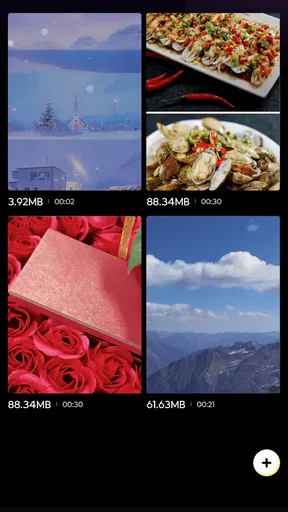
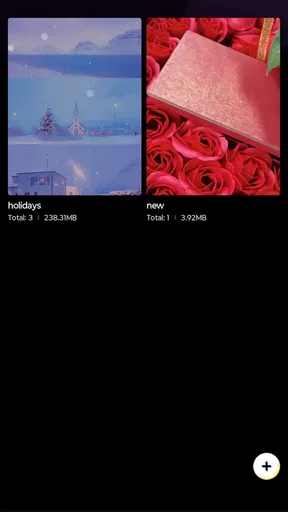
VimFlow is the kind of video tool I would keep for quick, orderly edits rather than cinematic production. Developed by MKH apps, it sits in the video players and editors category and focuses on making everyday clip organization feel less scattered. I found its appeal in the small workflow: open a clip, make a simple adjustment, keep related material together, and move on without turning a short task into a full editing session.
The app is free and suitable for everyone, which makes it easy to try without committing to a paid editing suite. Its current version is 1.0.4, and it runs on Android 7.0 or later. Those details matter if you are using an older phone or recommending it to a family member who does not want a complicated creative workstation.
What I like most is the restrained character. VimFlow does not present itself as a replacement for a professional editor. Instead, I see it as a practical companion for people who want a smoother way to handle ordinary video tasks. That distinction is important: it can be a comfortable fit for organizing and making straightforward changes, but it is not the app I would choose for elaborate effects, multi-layer storytelling, or a highly controlled export workflow.
How VimFlow fits into a normal editing routine
I find VimFlow easiest to judge as part of a repeatable routine, not by how many tools it appears to offer at first glance. This section looks at how to choose a clip, keep the editing task focused, and decide when a simple pass is enough. From there, I’ll turn to the small setup checks that can prevent avoidable snags.
A useful starting workflow for everyday clips
My preferred way to use VimFlow is to begin with a clear purpose. Before opening a clip, I decide whether I am trying to tidy it, prepare it for sharing, or simply make it easier to find later. That sounds basic, but it prevents the common mobile-editing habit of opening several tools and making random changes without a finished result in mind.
For a short family video, for example, I would first identify the usable moment, remove anything that makes the clip feel unfinished, and then review the result from beginning to end. I would not immediately add decoration or try to force a dramatic style onto ordinary footage. The strength of a simple editor is that it lets the content remain the focus.
VimFlow works best when I treat each clip as a small, complete job. I open one item, inspect it carefully, make the necessary adjustment, and check the outcome before moving to the next. This approach is more reliable than importing a large collection and hoping the app will somehow turn it into a finished library.
Worth Reading Before You Choose

EA SPORTS FC Mobile 26 Is a Bigger Football Game, but It Takes Time

Flipboard Shows What News Apps Must Do Beyond the Feed

Switching to Android Auto Means Rethinking Your Driving Routine

Google Calendar Makes a Crowded Week Easier to Manage

Ludo King Makes the Most of the Minutes Between Plans

Baby Panda World Brings Quick Play to Modern Phones, but Its Game Library Feels Busy
That single-item rhythm is also helpful on a phone with limited attention space. A mobile screen encourages quick decisions, and a focused routine reduces mistakes such as editing the wrong copy or overlooking an awkward beginning and ending. I recommend keeping the original clip untouched until the edited version has been checked. That habit is more valuable than any shortcut because it gives me a safe way back if the result is not right.
Where the simple approach saves time
Many people do not need a timeline filled with tracks, transitions, filters, captions, and audio controls. They need to turn a rough recording into something presentable. In that situation, VimFlow feels more approachable than a large desktop-style editor squeezed onto a phone screen.
I especially see a place for it in personal video housekeeping. A user might record several versions of the same moment, keep the strongest one, and prepare it for sending to a friend. Another person might use it to make a short clip easier to review before storing it. These are modest tasks, but they are exactly where an oversized editor can create unnecessary friction.
The app is also a reasonable first step for someone who finds traditional editing interfaces intimidating. The free price removes one barrier, while the Everyone content rating makes it suitable for a broad household audience. I would still show a new user the workflow rather than simply handing over the phone: open the media, identify the intended result, make one change at a time, and review before leaving the project.
What I would not expect from it
I would not choose VimFlow for a polished social campaign, a short film, or a project requiring precise control over multiple audio and video layers. Those jobs usually benefit from a more established editor with a broad toolset and detailed timeline controls. A simple app can be easier to learn, but that simplicity becomes a limitation when the project itself is complicated.
I also would not use it as my only tool for managing a large archive without first creating my own system outside the editor. The app may make individual handling smoother, but good organization still depends on sensible filenames, folders, and a consistent habit of reviewing finished clips. No lightweight editor can replace that discipline.
Settings I would check before doing serious work
When I install a compact editing app, I spend a few minutes checking its available settings before starting a larger batch. I look for options related to how media is opened, how edits are saved, and whether the app offers a clear way to return to the original material. I do not change everything immediately; I first learn which choices affect the workflow I actually use.
For VimFlow, that preparation is worthwhile because a clean routine depends on knowing what happens after an edit. I want to understand whether I am working on a separate result or altering the source item, and I want to know where the finished file will be easiest to locate. Even when an app feels simple, these are the details that determine whether it remains convenient after repeated use.
I would also check how the interface behaves in the orientation I normally use. Video editing on a small display can feel very different in portrait and landscape, and the most comfortable arrangement depends on the clip and the phone. If I am reviewing a wide recording, I prefer giving the preview as much screen space as possible. For quick browsing, portrait use may feel more natural.
Another practical check is the device itself. Android 7.0 compatibility makes VimFlow accessible to older hardware, but compatibility does not guarantee the same comfort on every phone. Before a long session, I would close unrelated apps, make sure there is enough storage for another video copy, and avoid editing while the device is already struggling. These are simple precautions, yet they reduce the chance of an interrupted workflow.
Settings are useful only when they support a habit
Experienced users often appear faster because they make fewer decisions, not because they rush. I try to keep my own settings stable once I find a comfortable arrangement. Constantly changing the interface or switching between different ways of handling clips creates hesitation, especially when I am working through several similar recordings.
My basic rule is to use one repeatable path for routine edits. I preview the source, make the smallest necessary change, check the beginning and ending, and then confirm the result. If a setting does not improve one of those steps, I leave it alone. This keeps the app from becoming another place where I spend time adjusting the tool instead of finishing the video.
For shared devices, I would explain the same routine to other users. A family member who only edits occasionally does not need a long lesson about every option. They need to know how to identify the correct clip, avoid losing the original, and find the finished version. VimFlow’s approachable purpose makes that kind of handoff easier than it would be with a feature-heavy editor.
Faster patterns that remain safe
The fastest pattern I found is batching by intention rather than by location. Instead of opening every recent recording, I first decide which clips belong to the same task. For instance, I might handle videos intended for a private message separately from clips I want to keep in my personal archive. This prevents unnecessary edits and makes the final review more focused.
A second useful habit is to watch the entire result once, even when the change seems obvious. A clip can look correct at the point of editing while still having an awkward first second, an abrupt finish, or an accidental section that was not noticed during the initial pass. A complete review is a small investment that protects against embarrassing shares.
I also recommend using descriptive names or folders around the editing process when the phone’s file system allows it. The point is not to create a complicated catalog. It is simply to separate original material from finished material. A folder for untouched recordings and another for ready-to-share clips can make VimFlow feel more organized without requiring a large media-management system.
One less obvious advantage of this approach is that it makes mistakes easier to diagnose. If a finished clip looks wrong, I can compare it with the original and identify whether the issue came from the edit, the chosen source, or the way the file was saved. Without that separation, a user may keep repeating the same mistake because every copy looks similar.
How I would use it in a real day
Imagine recording a short cooking demonstration for a friend. The first take includes a pause while finding an ingredient, the second has better framing but a noisy beginning, and the third is useful only as a reference. I would keep the original recordings, select the strongest take, use VimFlow for the basic cleanup, and review the final clip before sending it.
I would not edit all three simply because they are available. That creates clutter and makes it harder to decide which version is final. Instead, I would use the app as a decision-making aid: identify the best source, make a modest improvement, and finish with a file that has a clear purpose.
This same method works for travel clips, school activities, pet videos, and short demonstrations. The app is most helpful when the user already knows what “done” means. It cannot decide which moment matters to you, but it can support a tidy process once you have made that choice.
Where speed stops being an advantage
There is a point where trying to work faster becomes counterproductive. If I repeatedly reopen a clip because I did not check the result, the supposedly quick workflow becomes slower than a careful one. Similarly, if I make several adjustments at once, it becomes harder to understand which change improved or damaged the video.
For that reason, I prefer a short cycle: preview, edit, review, and save. The cycle is simple enough for beginners but disciplined enough for experienced users. It also makes the app easier to judge fairly. If the task cannot be completed comfortably through that cycle, I take it as a sign that the project may have outgrown a lightweight editor.
Advanced limits and choosing another editor
VimFlow’s straightforward identity is both its benefit and its boundary. Users who want detailed creative control should compare it with a full-featured mobile editor before committing to a larger project. Advanced alternatives are generally better when a video needs layered sound, carefully timed text, complex transitions, color work, or a very specific output setup.
That does not make VimFlow weak; it makes it specialized. I would rather see a small tool do ordinary editing clearly than use a crowded interface for a task that needs only a clean result. The important question is not whether the app has every possible function. It is whether the functions available match the way you make videos.
Another trade-off is learning depth. A larger editor may take longer to understand, but that time can pay off for users who edit frequently. VimFlow should appeal more to people who value immediate familiarity and repeatable basics. If you expect your projects to become increasingly ambitious, starting with a more expandable editor may avoid switching later.
Performance expectations should also remain realistic. Older Android phones can run the required operating system, yet video work may still feel more comfortable on newer hardware with more free storage. I would test one representative clip before moving a whole collection into the app. That small trial tells me whether the screen, handling, and save process fit my device and my patience.
Privacy-conscious users should apply the same care they would use with any media application: review the system prompts shown during setup and grant only the access needed for the task. Personal videos deserve deliberate handling, particularly on a shared phone. The app’s broad age rating does not remove the need for sensible media habits.
Who should install it
I would recommend VimFlow to someone who wants a free, uncomplicated video editor for routine organization and basic preparation. It is a good candidate for casual creators, families, students handling short assignments, and anyone who feels overwhelmed by the controls in larger editing suites.
The app also makes sense for people who prefer a repeatable workflow over a long list of creative options. If your usual task is to inspect a clip, make a straightforward improvement, and keep the result organized, its focused design is likely to feel comfortable.
I would suggest skipping it, or at least testing it only on a small project, if you need professional-style control, extensive effects, or a complex timeline. In those cases, a more advanced alternative will probably save time in the long run, even if it takes longer to learn at the beginning.
My verdict after building a routine around it
VimFlow has earned a favorable impression from me because it understands the value of a calm workflow. It is not trying to turn every phone owner into a filmmaker. Instead, it suits the everyday moment when a video needs attention but not a production studio.
The app has a 4.6 average from around 431 ratings and has passed 10 thousand installs, which suggests that its simple approach has found an audience. I treat those figures as useful context rather than a substitute for testing it with my own clips. The free cost makes that test easy, and the Everyone rating keeps the app approachable for a wide range of users.
My final recommendation is to install it with a specific small task in mind. Keep the original, check the settings that affect saving and file handling, work in short batches, and review every finished clip from start to end. Those habits reveal where the app is strongest and prevent its simplicity from becoming disorganization.
VimFlow is best when the goal is a finished, manageable video rather than an elaborate production. I would choose it for quick personal editing and orderly routines, while reaching for a deeper editor whenever the project demands layers, precision, or room to grow.
Pros
- Clean
- distraction-free interface for focused writing and editing.
- Keyboard-driven workflow helps experienced Vim users work efficiently.
- Lightweight design uses fewer resources than many full-featured editors.
- Customizable shortcuts can adapt the app to different editing habits.
- Useful for drafting notes
- code
- and plain-text documents on the go.
Cons
- The Vim learning curve may frustrate users unfamiliar with modal editing.
- Limited formatting tools make it unsuitable for rich-text documents.
- Mobile text entry can feel awkward when relying on Vim commands.
- Some advanced features may require configuration or technical knowledge.
- The interface may appear too minimal for users wanting visual organization tools.
FAQs for VimFlow
What is VimFlow, and who is it designed for?
VimFlow is a productivity and workflow-focused application intended to help users organize tasks, manage routines, and maintain a more structured daily schedule. It may be useful for students, professionals, freelancers, and anyone who wants to reduce distractions and keep important activities in one place. Before downloading, check the current app description to confirm which planning, tracking, or customization features are included in your version.
Is VimFlow easy to use for beginners?
VimFlow is generally designed around a practical workflow, but the learning experience can depend on how many features are enabled and how familiar you are with productivity tools. New users should be able to begin with basic tasks or routines before exploring advanced settings. Spend a few minutes reviewing the interface, notification options, and organization system so the app fits your personal working style rather than becoming another source of complexity.
Does VimFlow require an internet connection to work?
The connection requirements may vary depending on the specific VimFlow version and the feature you want to use. Basic information stored locally may remain accessible without an internet connection, while synchronization, account services, backups, or online integrations could require access to the web. If offline use is important to you, review the app’s latest store listing and privacy information before installing it on your primary device.
Is VimFlow free to download, and are there in-app purchases?
VimFlow’s download price and available features can differ between Android and iOS, as well as between regions and app updates. Some versions may offer core tools at no cost while reserving advanced options, expanded customization, synchronization, or additional services for a subscription or one-time purchase. Always check the official store page for current pricing, trial conditions, renewal details, and cancellation instructions before starting any paid plan.
What privacy and permissions should I consider before using VimFlow?
Before using VimFlow, review the permissions requested during setup and confirm that they match the app’s purpose. A productivity application may request access related to notifications, calendar information, reminders, or account synchronization, depending on its features. Read the developer’s privacy policy to understand what data is collected, how it is stored, whether information is shared with third parties, and how you can delete your account or data.


